
Introduction
Understanding the ASP.NET Core Request Pipeline is mandatory for senior .NET developers.
It explains how a request enters, which components process it, and how the response is returned.
This post explains the exact execution order with Middleware, Routing, Filters, MVC, and Response flow — clearly and interview-ready.
What Is the ASP.NET Core Request Pipeline?

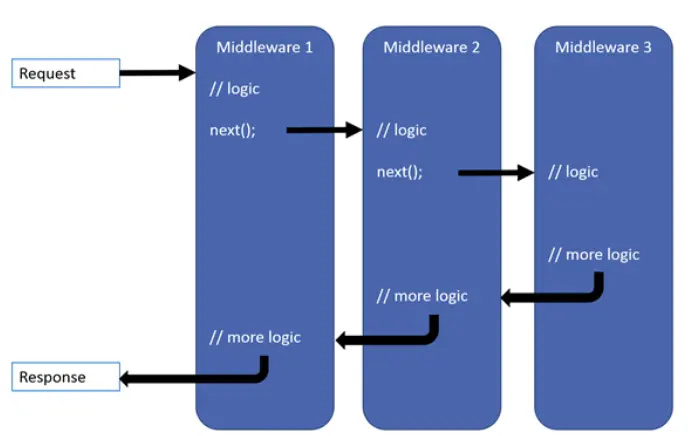
The request pipeline is a chain of middleware components that handle an HTTP request sequentially.
Each middleware:
- Can process the request
- Can pass it forward
- Can stop the pipeline (short-circuit)
High-Level Request Flow
Client Request
   ↓
Middleware (Incoming)
   ↓
Routing
   ↓
Authorization
   ↓
MVC (Filters + Controller + Action)
   ↓
Middleware (Outgoing)
   ↓
Response to Client
Core Components in Execution Order
1️⃣ Middleware (Incoming Request)
- Executes in the order registered
- First chance to handle the request
- Examples:
- Exception handling
- Logging
- Authentication
- CORS
app.UseMiddleware<CustomLoggingMiddleware>();
2️⃣ Routing Middleware
Determines which endpoint should handle the request.
app.UseRouting();
📌 No controller/action is executed here — only route matching.
3️⃣ Authentication Middleware
Identifies who the user is.
app.UseAuthentication();
- Reads JWT / cookies
- Sets
HttpContext.User
4️⃣ Authorization Middleware
Checks what the user is allowed to access.
app.UseAuthorization();
⛔ Can stop request before MVC if unauthorized.
MVC Execution (Inside Endpoint)
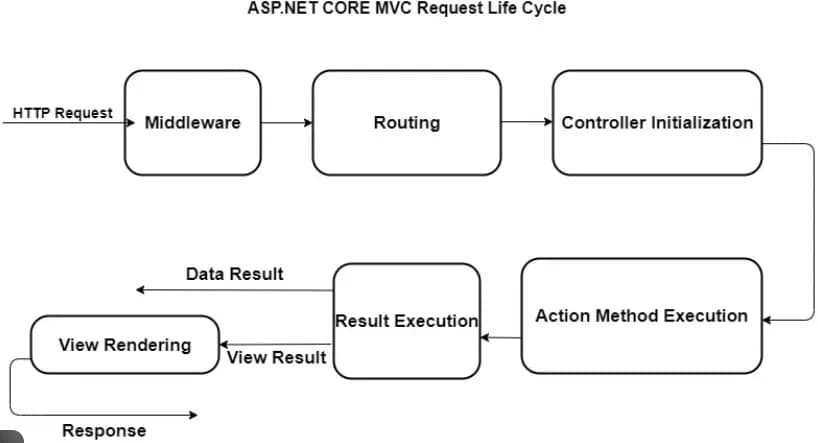
5️⃣ Filters Execution Order
Inside MVC, filters execute in this order:
- Authorization Filters
- Resource Filters
- Action Filters
- Action Method
- Result Filters
- Result Execution
6️⃣ Controller Action
This is where your business logic runs.
public IActionResult GetUsers()
{
    return Ok(users);
}
Response Flow (Outgoing)
After action execution:
- Result filters run
- Response travels back through middleware
- Each middleware can modify response
📌 Example:
- Response compression
- Logging response status
Middleware Registration Order (VERY IMPORTANT)
app.UseExceptionHandler();
app.UseHttpsRedirection();
app.UseRouting();
app.UseAuthentication();
app.UseAuthorization();
app.MapControllers();
❗ Wrong order = bugs + security issues
Middleware vs Filters (Quick Recap)
| Aspect | Middleware | Filters |
|---|---|---|
| Level | Application | MVC |
| Executes | Before MVC | Inside MVC |
| Scope | Global | Controller/Action |
| Best for | Cross-cutting | Action-specific |
Common Interview Questions
❓ Who executes first: Middleware or Filters?
✔ Middleware always executes first
❓ Can Filters handle exceptions globally?
✔ No — Exception Middleware is better
❓ Can middleware access action parameters?
❌ No — filters can, middleware cannot
Best Practices (Production)
✔ Keep middleware lightweight
✔ Use filters for MVC-specific logic
✔ Handle exceptions as early as possible
✔ Maintain correct registration order
Read our detailed guides on Middleware vs Filters in ASP.NET Core – Differences & Examples, Design Patterns & Dependency Injection in detail.
Explore more important concepts here…
Pingback: Exception Handling in ASP.NET Core - Complete Guide - Mika Dev Hub
Pingback: Middleware vs DelegatingHandler in ASP.NET Core
Pingback: How to Fix CORS Error in ASP.NET Core API (2026 Guide) - Mika Dev Hub
Pingback: Role-Based vs Policy-Based Authorization in ASP.NET Core