
Authentication and Authorization are core security pillars of any ASP.NET Core application.
Although they are often used together, they serve different purposes and execute at different stages in the ASP.NET Core request pipeline.
In this complete guide, you’ll learn:
- Authentication vs Authorization differences
- ASP.NET Core authentication & authorization pipeline order
- How middleware works internally
- Real-world examples and best practices
- Common interview questions
Authentication vs Authorization in ASP.NET Core
🔐 Authentication
👉 Who are you?
Verifies the identity of the user.
Examples:
- JWT Bearer Token
- Cookies
- OAuth / OpenID Connect
- Azure AD
🛡 Authorization
👉 What are you allowed to do?
Checks permissions after authentication.
Examples:
- Roles
- Claims
- Policies
- Custom authorization handlers
Where Authentication & Authorization Fit in the Pipeline
Simplified Pipeline Order
Request
 ↓
Exception Handling Middleware
 ↓
Routing
 ↓
Authentication Middleware
 ↓
Authorization Middleware
 ↓
Endpoint (Controller / Minimal API)
 ↓
Response
📌 Important Rule:
Authorization always depends on Authentication.
Authentication Middleware in ASP.NET Core
- Reads credentials (token, cookie, header)
- Validates the user
- Creates a
ClaimsPrincipal - Sets
HttpContext.User
Authentication Configuration Example (JWT)
builder.Services.AddAuthentication("Bearer")
    .AddJwtBearer("Bearer", options =>
    {
        options.Authority = "https://auth.example.com";
        options.Audience = "api1";
    });

app.UseAuthentication();
Authorization Middleware in ASP.NET Core
- Runs after authentication
- Evaluates policies, roles, and claims
- Allows or blocks access to endpoints
Authorization Configuration Example
builder.Services.AddAuthorization(options =>
{
    options.AddPolicy("AdminOnly", policy =>
        policy.RequireRole("Admin"));
});

app.UseAuthorization();
Using Authorization in Controllers
[Authorize]
public IActionResult SecureData()
{
    return Ok("Authenticated user");
}

[Authorize(Policy = "AdminOnly")]
public IActionResult AdminData()
{
    return Ok("Admin access");
}
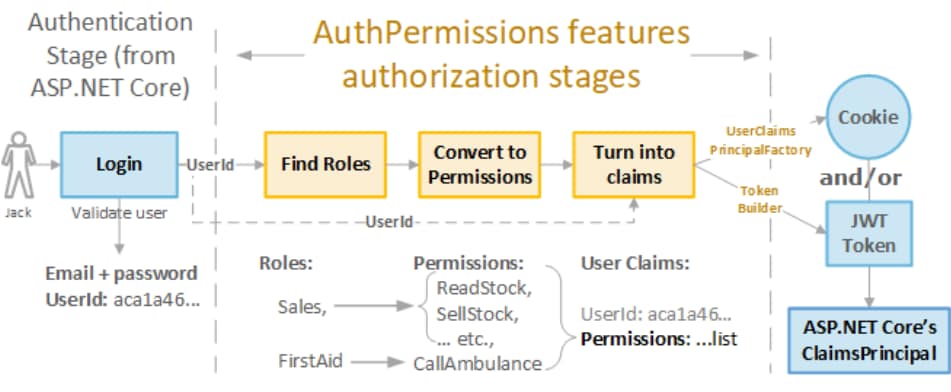
Authentication & Authorization Execution Flow
Step-by-Step Flow
- Request hits middleware pipeline
- Authentication middleware validates identity
- User claims are attached to
HttpContext.User - Authorization middleware checks permissions
- Endpoint executes (or returns 401/403)
HTTP Status Codes Explained
| Scenario | Status Code |
|---|---|
| Not Authenticated | 401 Unauthorized |
| Authenticated but not allowed | 403 Forbidden |
| Authorized | 200 OK |
📌 Interview Favorite Question
Common Mistakes Developers Make
❌ Calling UseAuthorization() before UseAuthentication()
❌ Assuming [Authorize] performs authentication
❌ Mixing roles and claims incorrectly
❌ Hardcoding authorization logic in controllers
Best Practices (Production Ready)
✅ Always place middleware in correct order
✅ Use policy-based authorization
✅ Prefer claims over roles
✅ Centralize authorization logic
✅ Combine with exception handling middleware
Middleware Order (Correct Way)
app.UseRouting();

app.UseAuthentication();
app.UseAuthorization();

app.MapControllers();
⚠ Wrong order breaks security silently.
Authentication & Authorization in Minimal APIs
app.MapGet("/secure", [Authorize] () =>
{
    return "Protected endpoint";
});
Policies and authentication behave the same way.
❓ Frequently Asked Questions – Authentication & Authorization Pipeline in ASP.NET Core (In-Depth)
1. What does Authentication mean in ASP.NET Core?
Authentication identifies the user who sends a request.
When a user logs in, ASP.NET Core:
- Reads credentials (JWT, cookie, OAuth token)
- Validates them
- Creates a
ClaimsPrincipal - Attaches the user identity to
HttpContext.User
👉 Example (JWT Authentication):
app.UseAuthentication();
This middleware extracts the token from the request header and verifies it.
✅ If validation succeeds → user becomes authenticated
❌ If validation fails → user remains anonymous
2. What does Authorization mean in ASP.NET Core?
Authorization controls access to resources.
After authentication:
- ASP.NET Core checks roles
- Evaluates policies
- Reads claims
👉 Example:
[Authorize]
public IActionResult GetProfile()
{
    return Ok("User Profile");
}
Only authenticated users can access this endpoint.
3. How does the Authentication & Authorization pipeline work?
The pipeline executes in a fixed order for every request.
Request Flow:
- Client sends request
- Authentication middleware identifies user
- Authorization middleware checks permissions
- Controller action executes
👉 Pipeline Configuration:
app.UseAuthentication();
app.UseAuthorization();
ASP.NET Core stops the pipeline immediately if authentication or authorization fails.
4. Why does Authentication run before Authorization?
Authorization requires a known user.
Authentication:
- Builds the user identity
- Loads claims and roles
Authorization:
- Evaluates permissions using that identity
❌ Without authentication → authorization has no user to validate
✅ With authentication → authorization works correctly
5. What happens when authentication fails?
ASP.NET Core:
- Treats the user as anonymous
- Blocks secured endpoints
- Returns 401 Unauthorized
👉 Example:
- Expired JWT token
- Missing Authorization header
401 Unauthorized
6. What happens when authorization fails?
ASP.NET Core:
- Confirms the user identity
- Rejects access due to insufficient permissions
- Returns 403 Forbidden
👉 Example:
- Logged-in user
- Tries to access Admin-only API
403 Forbidden
7. What role does [Authorize] play in the pipeline?
[Authorize] activates authorization checks.
When ASP.NET Core sees [Authorize]:
- It forces authentication
- It evaluates authorization rules
👉 Example:
[Authorize]
public IActionResult Orders()
{
    return Ok();
}
This endpoint blocks anonymous users.
8. How does [AllowAnonymous] change pipeline behavior?
[AllowAnonymous] bypasses authentication and authorization.
👉 Example:
[AllowAnonymous]
public IActionResult Login()
{
    return View();
}
ASP.NET Core skips security checks and allows public access.
9. How does Role-Based Authorization work internally?
Role-based authorization checks the Roles claim.
👉 Example:
[Authorize(Roles = "Admin")]
public IActionResult DeleteUser()
{
    return Ok();
}
ASP.NET Core:
- Reads user roles from claims
- Matches required role
- Grants or denies access
⚠️ This approach becomes hard to manage in large systems.
10. How does Policy-Based Authorization work?
Policy-based authorization defines rules outside controllers.
👉 Policy Definition:
services.AddAuthorization(options =>
{
    options.AddPolicy("AdminOnly",
        policy => policy.RequireRole("Admin"));
});
👉 Usage:
[Authorize(Policy = "AdminOnly")]
public IActionResult Dashboard()
{
    return Ok();
}
✅ Cleaner code
✅ Centralized logic
✅ Easy to extend
11. Why should you prefer Policy-Based Authorization?
Policy-based authorization:
- Separates concerns
- Reduces duplication
- Improves maintainability
Large applications always use policies instead of direct role checks.
12. What are Claims and how do they affect authorization?
Claims store user-specific information.
👉 Examples of claims:
- Department
- Permission level
👉 Claim-Based Policy:
policy.RequireClaim("Department", "Finance");
ASP.NET Core allows access only when the claim matches.
13. Where should you write authorization logic?
✅ Write authorization logic in:
- Policies
- Authorization handlers
❌ Do not write authorization checks inside controllers or services.
This keeps the code secure and testable.
14. Can authentication work without authorization?
Yes.
👉 Example:
- Public dashboard
- Personalized greeting
ASP.NET Core identifies users but does not restrict access.
❌ Authorization cannot work without authentication.
15. What happens if you forget UseAuthorization()?
ASP.NET Core:
- Ignores
[Authorize] - Allows unrestricted access
- Creates a serious security issue 🚨
Always register both middlewares.
16. Why does middleware order matter so much?
Middleware executes top to bottom.
👉 Correct order:
app.UseAuthentication();
app.UseAuthorization();
👉 Wrong order breaks security checks.
17. How does the pipeline behave in Web APIs?
In APIs:
- Clients send JWT tokens
- Middleware validates tokens
- Authorization protects endpoints
This ensures stateless and secure communication.
18. Real-world example of Authentication & Authorization
Think of an airport:
- Authentication → Security checks your passport
- Authorization → Boarding pass grants access to gates
- Controller → You board the plane
19. Why do interviewers focus on this topic?
Interviewers test:
- Middleware understanding
- Security flow knowledge
- Real-world ASP.NET Core experience
This topic shows senior-level backend knowledge.
20. What mistakes do developers commonly make?
❌ Wrong middleware order
❌ Authorization logic inside controllers
❌ Overusing roles
❌ Missing policies
Avoid these to build secure and scalable applications.
Conclusion
Authentication and Authorization in ASP.NET Core are middleware-driven, pipeline-based, and order-sensitive.
📌 Quick Summary
- Authentication → Identity
- Authorization → Permissions
- Both are middleware
- Order matters
- Policies are preferred
Read our detailed guides on Middleware vs Filters in ASP.NET Core – Differences & Examples, Design Patterns & Dependency Injection in detail.
Explore more important concepts here…
Pingback: How to Fix 401 Unauthorized in ASP.NET Core JWT (Complete Practical Guide) - Mika Dev Hub